


Nest Cam with Floodlight - Google Store
Nest Cam with floodlight (wired)
$199.99$279.99
or $16.67/month with 12-month financing*
Nest Cam with floodlight (wired)
$199.99$279.99
or $16.67/month with 12-month financing*
Know more.
Spot what matters.
Spot what matters.

Save $80 on Nest Cam with floodlight. Ends 01/07.
Save $80 on Nest Cam with floodlight. Ends 01/07.
A floodlight meets a security camera meets intelligence.
Google Home app required. Learn more.

Shine a brighter light on what’s happening.
Built-in intelligent alerts help you know and see what's relevant. Tell the difference between people, vehicles, and animals.

Make the
floodlight yours.
floodlight yours.
Create Routines and adjust brightness, sensitivity, and how long the light stays on.

Quickly
take action.
take action.
Turn it on with your voice and talk through the camera if you need to.

Keep your data
safe and secure.
safe and secure.
Two-step verification enhances security, and the green LED light lets you know it's recording.

Shine a brighter light on what’s happening.
The built-in intelligence of Nest Cam helps you stay aware of important activity. It can automatically turn on the lights, as well as send you an alert.

Intelligent alerts delivered right to your phone.

Person seen

Animal seen

Vehicle seen

Familiar faces
(with Google Home Premium)
(with Google Home Premium)
Person seen
Animal seen
Vehicle seen
Familiar faces
(with Google Home Premium)
(with Google Home Premium)
Person seen
Animal seen
Vehicle seen
Familiar faces
(with Google Home Premium)
(with Google Home Premium)
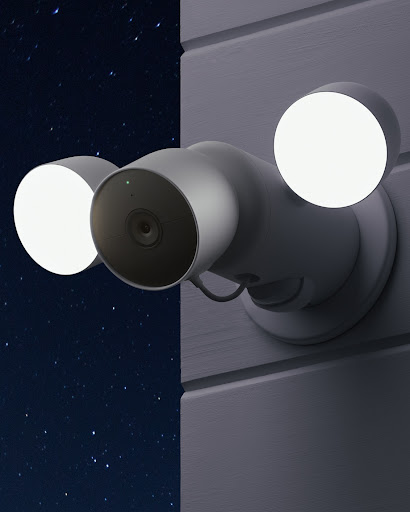
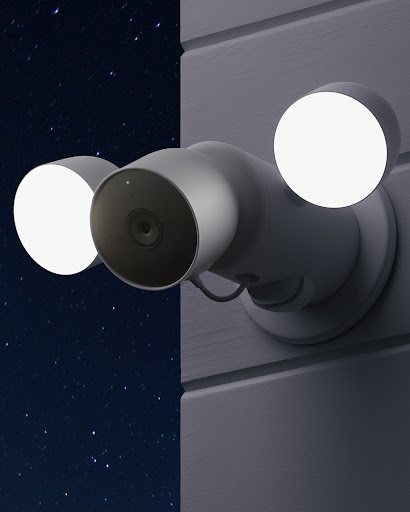
Light a path when you need it.
Two LED lights and 180° motion detection add brightness and flexibility, so virtually nothing will go undetected.
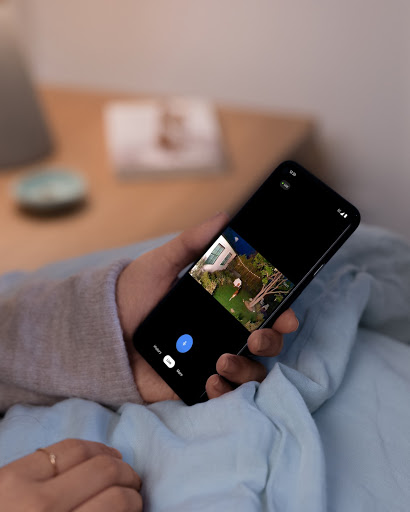
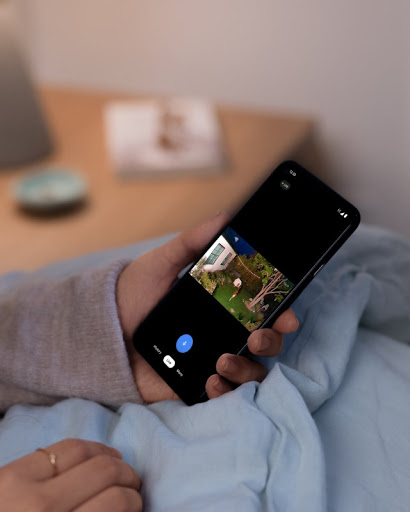
Check in on your home in crisp HDR.
Use the Google Home app to see what’s happening near your floodlight 24/7 in 1080p HDR video. Night vision helps you see in low light.
Look back with ease.
Need to review something you missed? Look back with up to three hours of event video history included.

Upgrade to Google Home Premium for a smarter, safer home.
A Google Home Premium subscription helps you get more from your Nest Cam.


Scroll less. Find more.
Get the fuller picture behind every alert.
Create easy home automations.
Know what all your devices are up to.
Search your video history in the Google Home app with help from Gemini. Search something like “Who let the dogs out?” and get an event description and the relevant video clips (coming soon).
With Google Home Premium, your Nest Cam can know even more about what’s happening with detailed notifications. Plus, get daily summaries of what happened at home so you never miss a thing (coming soon).,
With Help Me Create with Gemini (coming soon), just type what you want to do in the Google Home app, like “Lock the doors and turn off the lights at bedtime.” Or, choose from preset automation ideas.,
The Google Home app shows the activity of all your compatible smart devices in one place, letting you see history for products from thousands of brands that work with Google Home.,
Scroll less. Find more.
Scroll less. Find more.
Search your video history in the Google Home app with help from Gemini. Search something like “Who let the dogs out?” and get an event description and the relevant video clips (coming soon).
Get the fuller picture behind every alert.
With Google Home Premium, your Nest Cam can know even more about what’s happening with detailed notifications. Plus, get daily summaries of what happened at home so you never miss a thing (coming soon).,
Create easy home automations.
With Help Me Create with Gemini (coming soon), just type what you want to do in the Google Home app, like “Lock the doors and turn off the lights at bedtime.” Or, choose from preset automation ideas.,
Know what all your devices are up to.
The Google Home app shows the activity of all your compatible smart devices in one place, letting you see history for products from thousands of brands that work with Google Home.,

Make the floodlight yours.
Home security shouldn't be one size fits all. Set up the floodlight to fit your home and your schedule.

Tailor to your schedule.
Customize your routines to turn on or off the light at times that fit your unique lifestyle.

Dial brightness up or down.
Decide how bright or dim the lights should be for different times of the day or night.

Control sensitivity and timing.
Set up your Activity Zones, sensitivity, and kinds of detection so you only get alerts about what matters.

Quickly take action.
Know more about what's happening with relevant alerts. If you get an alert that an animal, vehicle, or unfamiliar person is near, you can talk through the camera to help drive them away.

Talk through the camera.
Don't just watch. With two-way talk, speak through the camera from anywhere.

Control it if you're away.
You can turn on the lights remotely to deter any unwanted persons or animals, whether you're home or not.

Just ask Google.
You can ask Google to turn on the lights and show you the video feed using just your voice with a Google Assistant-enabled device.

Protecting your privacy and security.
Nest Cam uses encrypted video, two-step verification, and enhanced security through your Google Account to help protect your family’s privacy. And a green LED light lets you know when the camera is processing or streaming video.Home & Away Routines give you the option of automatically turning your camera off when you’re home, so no video is streamed or recorded until you leave.
Visit the Safety Center to find out how Google Nest protects your information and respects your privacy, so that every day is safer with Google.
Visit the Safety Center to find out how Google Nest protects your information and respects your privacy, so that every day is safer with Google.
Protecting your privacy and security.
Nest Cam uses encrypted video, two-step verification, and enhanced security through your Google Account to help protect your family’s privacy. And a green LED light lets you know when the camera is processing or streaming video.Home & Away Routines give you the option of automatically turning your camera off when you’re home, so no video is streamed or recorded until you leave.
Visit the Safety Center to find out how Google Nest protects your information and respects your privacy, so that every day is safer with Google.
Visit the Safety Center to find out how Google Nest protects your information and respects your privacy, so that every day is safer with Google.

Pro installation.
Pro installation.

Device Recycling.
Device Recycling.

Free shipping.
Free shipping.

Finance your device.
Finance your device.